Clear Aligners
In Kennewick, WA
At , we design confident, camera-ready smiles with comfort and care.
About Clear Aligners
Insight
Understanding Clear Aligners
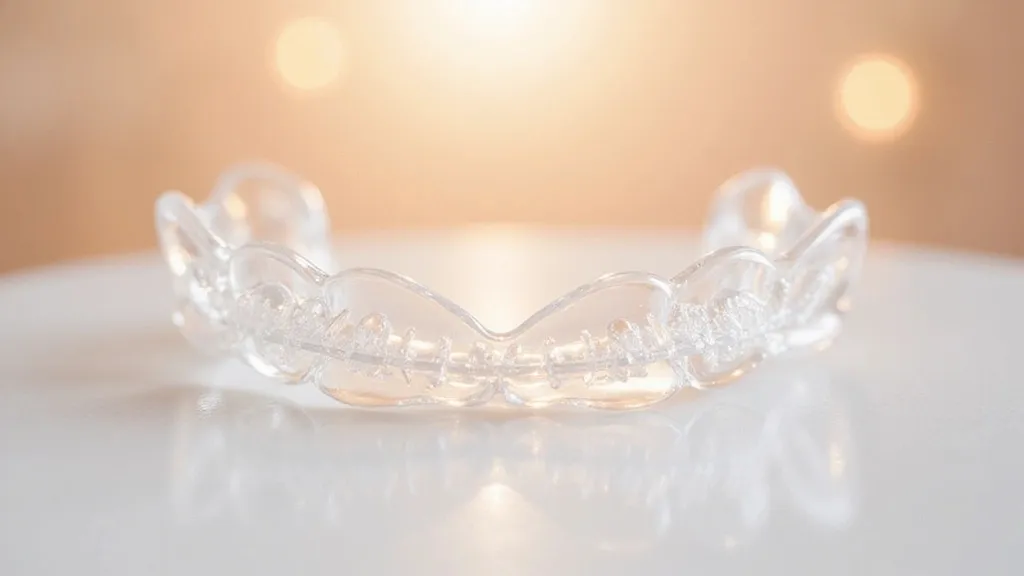
Clear Aligners is a modern way to straighten teeth using a series of clear, custom trays. Each tray fits snug and applies gentle pressure to guide teeth a little at a time. Most plans change trays on a set schedule, and the main rule is wear time: keep them in most of the day and night, removing them only to eat, drink anything but water, and clean your teeth. Because they are removable, daily habits matter more than with braces. A full dental check first helps confirm teeth and gums are healthy, so movement stays safe and steady. Photos or a digital scan map the bite and show the planned steps before you start.
With Clear Aligners, the dentist builds a step-by-step plan from scans, photos, and bite checks. Small tooth-colored bumps, called attachments, may be added to help the trays grip and guide tricky moves. Some people also need tiny smoothing between teeth, so crowded teeth can slide into place with less strain. This care can help with mild to moderate crowding, gaps, and some bite issues, but very complex cases may need braces or other tools. A key benefit is how discreet they look, which is why many adults choose them for work, travel, and social life. Because trays come out, you can brush and floss normally, which helps keep gums calm during treatment.
Results from Clear Aligners depend on steady wear and good checkups. When trays are left out too long, teeth can drift and the next tray may feel tight or not fit. Most plans include visits every few weeks so progress can be tracked and small fixes can be made early. Keeping the trays clean is simple: rinse often, brush them gently with a soft brush, and avoid hot water that can warp plastic. It is also smart to avoid do-it-yourself aligners without an in-person exam, since hidden gum disease, cavities, or bite problems can get worse. A dentist-led plan protects comfort while keeping the goal clear: a straighter smile that still feels like you.
Candidate
Who Benefits From Clear Aligners
Clear Aligners is often a great choice for teens and adults who want straighter teeth without the look of metal braces. You may be a good fit if you have mild to moderate crowding, small gaps, or teeth that tipped over time. It also helps people who had braces years ago and notice shifting, especially in the lower front teeth. Good candidates have healthy gums, no untreated cavities, and enough time to wear trays most hours of the day. If you live in or near Kennewick, WA, busy schedules, dining out, and travel are common, so discipline matters: the more you wear the trays, the smoother the plan goes. A consult can confirm if your bite needs aligners alone or extra support.

Approach
What Is The Process For Clear Aligners
Assessment
Treatment
Follow Up
Assessment
Goal talk + smile concerns
Review health + dental history
Check gums, decay, and enamel
Bite check for jaw strain
Scans, photos, and X-rays
Discuss wear-time commitment
Explain limits and options
Treatment
D plan made from your scans
Try-in of first trays
Add small attachments if needed
Teach insert and removal
Wear trays most hours daily
Switch trays on set schedule
Clean trays daily, no hot water
Use chewies for snug fit
Trim sharp edges if needed
Follow Up
Progress checks every few weeks
Refine fit if trays feel off
Track bite and gum health
Extra trays if plan changes
Discuss whitening timing
Retainers to hold results
Touch-up plan if teeth shift
Journey
Before, During, & After Clear Aligners
BEFORE: A great start begins with a full exam and a clear plan. Your dentist checks for cavities, gum swelling, and signs of grinding, since these can affect comfort and how teeth move. A scan or impressions are taken, plus photos to map your bite from every angle. You will also talk through your daily routine, because Clear Aligners works best when trays stay in most of the day. If you drink coffee or tea often, you will learn simple timing tricks so you can enjoy them and still meet wear goals. Many people do a cleaning first, so trays fit better and gums stay calm during the first weeks.
DURING: You wear a clear tray that gently guides teeth, then move to the next one as directed. At first, expect pressure for a day or two with each new tray, plus extra saliva while your mouth adjusts. You remove trays to eat and to brush and floss, then put them right back in. If attachments are used, they may feel like small bumps, but they help the trays do precise moves. Some people need thin elastic bands to fine-tune the bite. Checkups keep the plan on track, and they also catch small issues early, like a tray edge rubbing or a tooth not tracking as planned. If soreness flares, cold water, soft foods, and short breaks during meals usually help.
AFTER: When the last tray is done, the real win is keeping teeth in their new spots. Your dentist will fit you for retainers, since teeth can drift back if they are not held steady. Many plans start with retainer wear at night, but the exact schedule depends on your bite and how much movement you had. You may also get a final “refinement” set if a few teeth need a small extra nudge. Good habits protect your results: keep up with cleanings, replace worn retainers, and tell your dentist if you notice tightness or shifting. With steady retention, your smile stays straight, comfortable, and easy to care for.
Transformation
Getting Started With Clear Aligners
Clear Aligners can straighten crowded, spaced, or tilted teeth without metal brackets. Your first visit starts with photos, digital scans, and a bite check to see what tooth moves are safe. You’ll review a 3D preview of your new smile, expected timing, and how often you’ll switch trays. If you’re a good fit, custom trays are made to match your plan, and you’ll get clear steps for wear, cleaning, and eating. Quick check-ins track progress and comfort, and small tweaks keep results on target. Ready for a straighter smile and an “invisible braces” look? Start Clear Aligners today.

Book Now
Booking is simple, with flexible scheduling designed around your cosmetic goals.
Choose a time that fits your routine and start your personalized smile journey.
The staff was so welcoming and professional. My results exceeded expectations, and the entire experience was relaxing and enjoyable. I left feeling confident and refreshed!

Incredible service from start to finish! The team truly cares about your comfort and outcome. Everything felt clean, modern, and detail-oriented. Highly recommend!

I’ve never felt more cared for during an appointment. They explained every step clearly and made sure I was comfortable. The results speak for themselves—amazing!

Absolutely five-star experience. The staff was kind, knowledgeable, and attentive. You can tell they take pride in their work. I’ll definitely be returning soon.

From the first consultation to the final result, everything was flawless. The environment was spotless, and the results were beyond what I imagined. Truly life-changing.

Exceptional experience all around. They listened carefully to what I wanted and delivered with precision. I feel more confident and rejuvenated than ever.

Most Requested
Explore our most requested cosmetic treatments designed to enhance smiles naturally.
Discover popular services focused on whitening, veneers, and smile makeovers.


FAQ'S About Clear Aligners
How long do I need to wear Clear Aligners each day?
Most plans require wearing trays most of the day and night, only taking them out to eat, drink anything but water, and brush and floss.
Can Clear Aligners fix crowding and gaps?
It often helps with mild to moderate crowding or spacing. A consult is needed to confirm if your bite needs extra tools beyond trays.
Will Clear Aligners affect my speech?
Some people notice a light lisp for a few days while the tongue adjusts. It usually improves fast with normal talking.
Do I still need cleanings during Clear Aligners?
Yes. Regular cleanings help keep gums healthy while teeth move, and they also help trays fit comfortably.
Is Clear Aligners a good option in Kennewick, WA if I eat out often?
Yes, as long as you can remove trays to eat, brush, and put them back in quickly. Planning meals and carrying a small brush makes it easier.
Serving Our
Neighbors
We’re proud to support and serve our neighbors in communities big and small, from:
Ready For Change?
Take the first step toward a confident smile with expert cosmetic care. Book a consultation today and begin your personalized smile transformation.
Take the first step toward a confident smile with expert cosmetic care.
Operating Hours
Mon: 9:00am - 5:00pm
Tues: 9:00am - 5:00pm
Wed: 9:00am - 5:00pm
Thurs: 9:00am - 5:00pm
Fri: 9:00am - 5:00pm
Sat: Closed
Sun: Closed
LOCK CODE
<::::::::::>
Lock
<::::::::::>
CUSTOM CODES
<::::::::::>
STYLIZATIONS
VISUAL
<::::::::::>
Background Color
Gradient 90 Degrees
<::::::::::>
Background Color
Gradient 135 Degrees
<::::::::::>
SVG Carousel
Color
<::::::::::>
SVG Sequence
Color Icons
<::::::::::>
Outline Color
Radius 25px
<::::::::::>
Community Background
Gradient
<::::::::::>
Background Color
Gradient 315 Degrees
<::::::::::>
Background Color
Gradient 225 Degrees
<::::::::::>
Inner Shadow
Weak
<::::::::::>
Inner Shadow
Strong
<::::::::::>
Invert Color
Block Secondary A
<::::::::::>
Invert Color
Exempt
<::::::::::>
Background
Blur 20px
<::::::::::>
Outline Color
Radius 10px
<::::::::::>
Image
Black
<::::::::::>
Image
White
<::::::::::>
Image
Edge Fade
<::::::::::>
Gradient Color
Text
<::::::::::>
Corner Radius
15px
<::::::::::>
Corner Radius
25px
<::::::::::>
Corner Radius
50px
<::::::::::>
Corner Radius
Top 15px
<::::::::::>
Corner Radius
Top 25px
<::::::::::>
Mobile Shadow
None
<::::::::::>
Mobile Shadow
Block Primary
<::::::::::>
Desktop Border White
Left And Right 1px
<::::::::::>
Desktop Border Black
Left And Right 1px
<::::::::::>
Desktop Corner Radius
Bottom Left 50px
<::::::::::>
Desktop Corner Radius
Bottom And Top Left 50px
<::::::::::>
ANIMATIONS
PERMANENT
<::::::::::>
Text Wave
Effect
<::::::::::>
Credentials Carousel
Slide
<::::::::::>
Credentials Carousel
Edge Fade
<::::::::::>
Requested Carousel
Slide
<::::::::::>
Requested Carousel
Edge Fade
<::::::::::>
Pulse
Sequence
<::::::::::>
Pulse
Size
<::::::::::>
Bounce
Rhythm
<::::::::::>
ANIMATIONS
HOVER/SCROLL
<::::::::::>
Neon Outline Color
On Hover/Scroll
<::::::::::>
Shine
On Hover Bright~
<::::::::::>
Shine
On Hover Dim
<::::::::::>
Raise On Hover
Shadow
<::::::::::>
Raise On Hover
No Shadow
<::::::::::>
Grow
On Hover 1.015
<::::::::::>
Grow
On Hover 1.05
<::::::::::>
Desktop Text Revealed
On Hover
<::::::::::>
Desktop Expand
On Hover
<::::::::::>
Shift Up
On Hover
<::::::::::>
Mobile Text Reveal
On Scroll
<::::::::::>
Mobile Expand
On Scroll
<::::::::::>
Blur Sibling
On Hover
<::::::::::>
Becomes Blurred
From Sibling
<::::::::::>
Change Background
Color On Hover
<::::::::::>
Change Text
Color On Hover
<::::::::::>
Change Outline
Color On Hover
<::::::::::>
Opener
Menu Catalyst
<::::::::::>
ANIMATIONS
SINGULAR
<::::::::::>
Fade In
On Scroll
<::::::::::>
Shift In
On Scroll
<::::::::::>
MOVEMENTS
& MARGINS
<::::::::::>
Move Z Axis
Plus 10px
<::::::::::>
Move Y Axis
Up 10px
<::::::::::>
TECHNICAL
DYNAMICS
<::::::::::>
Image Adjusts
Aspect Ratio 16 To 9
<::::::::::>
Image Adjusts
Aspect Ratio 1 To 1
<::::::::::>
Image Adjusts
Aspect Ratio 5 to 6
<::::::::::>
Image Adjusts
Aspect Ratio 9 to 16
<::::::::::>
Image Adjusts
Aspect Ratio 3 to 4
<::::::::::>
Image Min Width 90%
Screen 1420px
<::::::::::>
Text 60px
Screen 1420px
<::::::::::>
Text 60px
Screen 1080px
<::::::::::>
Text 48px
Screen 1080px
<::::::::::>
Text 36px
Screen 1080px
<::::::::::>
Text And Divider
Row Adjust
<::::::::::>
Image Fixed Size
Stabilizer
<::::::::::>
Container Max Width
370px
<::::::::::>
Container Min Width
100% Screen 1420px
<::::::::::>
Safari Parallax Image
Off
<::::::::::>